
OpenMusic AI Review: Is This AI Music Video Generator Actually Worth Using?
- Staff Desk
- May 14
- 4 min read

A straightforward look at what OpenMusic AI's video tool does, who it's built for, and where it falls short.
Why AI Music Video Tools Are Having a Moment
Music without visuals is increasingly invisible online. YouTube, TikTok, and Instagram Reels have fundamentally changed how audiences consume audio content. A track without a visual layer rarely gets the traction it deserves — and that's not a creative problem anymore. It's a production bottleneck.
That's exactly the gap that AI music video generators are stepping in to fill. The question isn't whether these tools exist — it's whether any of them are actually good enough to use in a real workflow.
This review breaks it down honestly — no hype, no filler.
What OpenMusic AI Is Trying to Solve
The Core Problem It Addresses
Traditional music video production is expensive, slow, and technically demanding. Even a basic lyric video can require video editing software, motion graphics knowledge, and hours of manual work.
OpenMusic AI's video tool is designed to compress that entire process into a few minutes. The pitch is simple: upload audio, customize visuals, export a finished video.
Where It Fits in the Broader Ecosystem
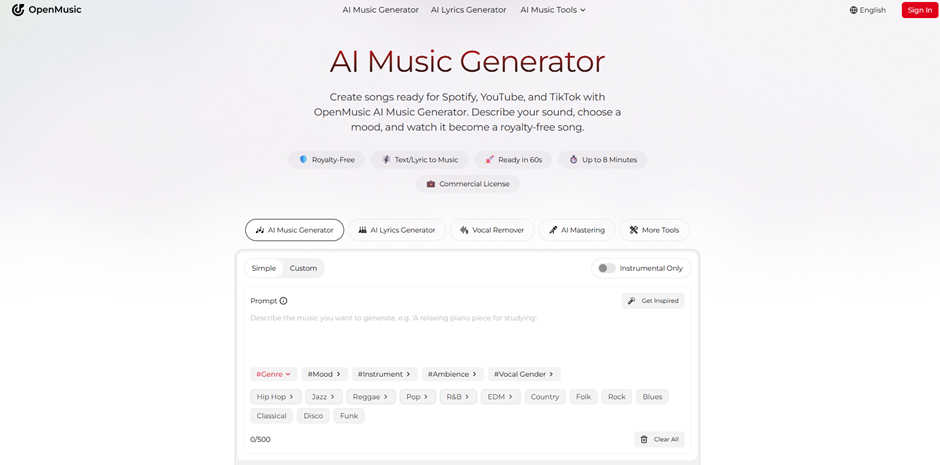
OpenMusic AI is primarily a music creation platform — it offers AI song generation, vocal tools, mastering, and stem splitting. The AI Music Video Generator is one module within that larger suite.
This matters because it means the tool is built to work natively with music you've already created inside the platform. That's a meaningful workflow advantage for existing users.
Feature Breakdown: What the Tool Actually Offers
Smart Audio-Visual Synchronization
The platform analyzes your uploaded track — its rhythm, tempo, and mood — and uses that data to generate visuals that move in sync with the audio. This isn't just a slideshow with background music. The AI maps transitions and effects to the song's structure.
In practice, beat-synced transitions feel noticeably more natural than platforms that apply generic visual templates regardless of the music's character.
Customization Depth
Users can upload their own images, add personal watermarks or logos, choose sound wave color styles, and select animated lyric display formats. Text prompts can also guide the visual direction — for example, describing a mood or aesthetic.
This level of customization is above average for tools in this category. Most basic AI music video generators offer little beyond preset templates.
Output Flexibility
The tool supports both single-image and multi-image video formats, with optional lyric overlays and sound wave visualizations. This makes it adaptable across different use cases — from a simple audio visualizer for a podcast to a full narrative-style music video. Supported aspect ratios cover the main platforms: horizontal for YouTube, vertical for TikTok and Reels.
Workflow Integration
Because OpenMusic AI is a unified platform, tracks created with its music generation tools can be fed directly into the video generator without exporting and re-importing files. For users already inside the ecosystem, this saves meaningful time.
Honest Assessment: Strengths and Limitations
What Works Well
Audio-visual sync quality is the strongest aspect of this tool. The AI's ability to read a track's energy and reflect it visually is more sophisticated than many competitors at a similar price point.
Customization options are genuinely useful — particularly the ability to add logos and watermarks, which matters for creators building a consistent brand identity.
Ease of use is real. The three-step workflow is accessible to non-technical users without sacrificing meaningful control.
The free credit tier allows new users to test the AI Music Video Generator before committing to a paid plan — a low-risk entry point.
Where It Falls Short
The visual output, while competent, can feel somewhat templated when using the default settings. Users who want highly cinematic or stylistically distinctive results will need to invest time in crafting detailed prompts and uploading custom imagery.
Commercial licensing terms depend on your subscription tier. Free and lower-tier users should review the terms carefully before publishing videos for monetized content.
The tool is most powerful for users already within the OpenMusic AI ecosystem. Standalone use — uploading tracks from other platforms — works fine, but some of the workflow advantages disappear.
Who This Tool Is Actually Built For
Independent Musicians and Bands
Artists who need professional-looking visuals without a video production budget will find this tool genuinely useful. It won't replace a full music video shoot, but it produces results that are credible for streaming platforms and social media.
Content Creators and Podcasters
YouTubers and audio-first creators who need a visual layer for their content — without learning video editing — are a natural fit. The lyric video and audio visualizer formats are particularly relevant here.
DJs and Live Performers
The tool's ability to generate audio-reactive visualizations makes it useful for VJ loops and live performance backdrops. This is a less obvious use case that the platform explicitly supports.
Hobbyists and Emerging Creators
For anyone just starting out, the free tier and intuitive interface make this a low-barrier entry point into the world of AI music video generation without requiring any prior technical knowledge.
Why This Category Matters Right Now
The market for AI-generated visual content is growing fast. According to various industry reports, short-form video consumption has increased by over 60% in the past three years — and the demand for music-paired visuals is a direct driver of that growth.
For independent creators, the traditional production cost of a music video ranges from hundreds to thousands of dollars. Tools like OpenMusic AI's AI Music Video Generator are compressing that cost to near zero, which has real implications for how music is marketed and distributed at the independent level.
This isn't about replacing professional video production. It's about making some level of visual content accessible to creators who previously had none.
Final Verdict
OpenMusic AI's AI Music Video Generator is a solid, well-integrated tool that does what it claims. The audio-visual sync is its strongest technical feature, and the customization options are more robust than most tools at this tier.
It's not a cinematic powerhouse, and it works best when you're already using OpenMusic AI for music creation. But for independent artists, content creators, and anyone who needs to turn audio into shareable visuals quickly — it's a genuinely practical option worth testing.
The free credit tier makes the barrier to entry low enough that there's no real reason not to try it before deciding.




Comments